
Quick Start
Install the Lightcone plugin and start an analysis with your agent.
Install the Lightcone plugin in your coding agent, then give the agent a research question.
Before you start: uv 0.12 or later
Check your version with uv --version. If you don't have uv yet, install it:
curl -LsSf https://astral.sh/uv/install.sh | shIf your uv is older, update it, for example with uv self update if you used the installer above.
Install the Lightcone plugin
The plugin teaches your agent to use Lightcone. When you start a project, it checks for the Lightcone CLI and offers to install the version it needs.
claude plugin marketplace add LightconeResearch/agent-skills
claude plugin install lightcone@lightcone-research
Start your first analysis
- Create an empty directory for the analysis.
- Start your agent in that directory.
- Give it your research question:
I want to start a new Lightcone analysis: <your research question>The words "new Lightcone analysis" are enough for your agent to pick up the Lightcone skill.
The agent then:
- Interviews you about the research question and how to structure the analysis, before it writes any code.
- Sets up the project: an
astra.yamlspecification, a uv environment, a git repository that keeps data and results in git-annex, and a MyST report. - Writes the plan into
astra.yaml: the inputs, outputs, decisions and evidence. A hook validates the file each time the agent saves it, and the agent shows you a summary. - Implements and runs the analysis once you approve the plan. The Lightcone CLI runs each step in a sandbox and commits each output with a record of how it was made.
Explore the project in JupyterLab (optional)
Lightcone Lab shows the project in JupyterLab: its results, the decisions behind
them and the papers they cite, so you don't have to read astra.yaml yourself. It needs JupyterLab
4.5.10 or newer.
To install it, open JupyterLab's Extension Manager (the puzzle piece in the left sidebar), search
for jupyterlab-lightcone, install it and restart JupyterLab. Then browse into the project's
directory: the launcher becomes the project's Home.
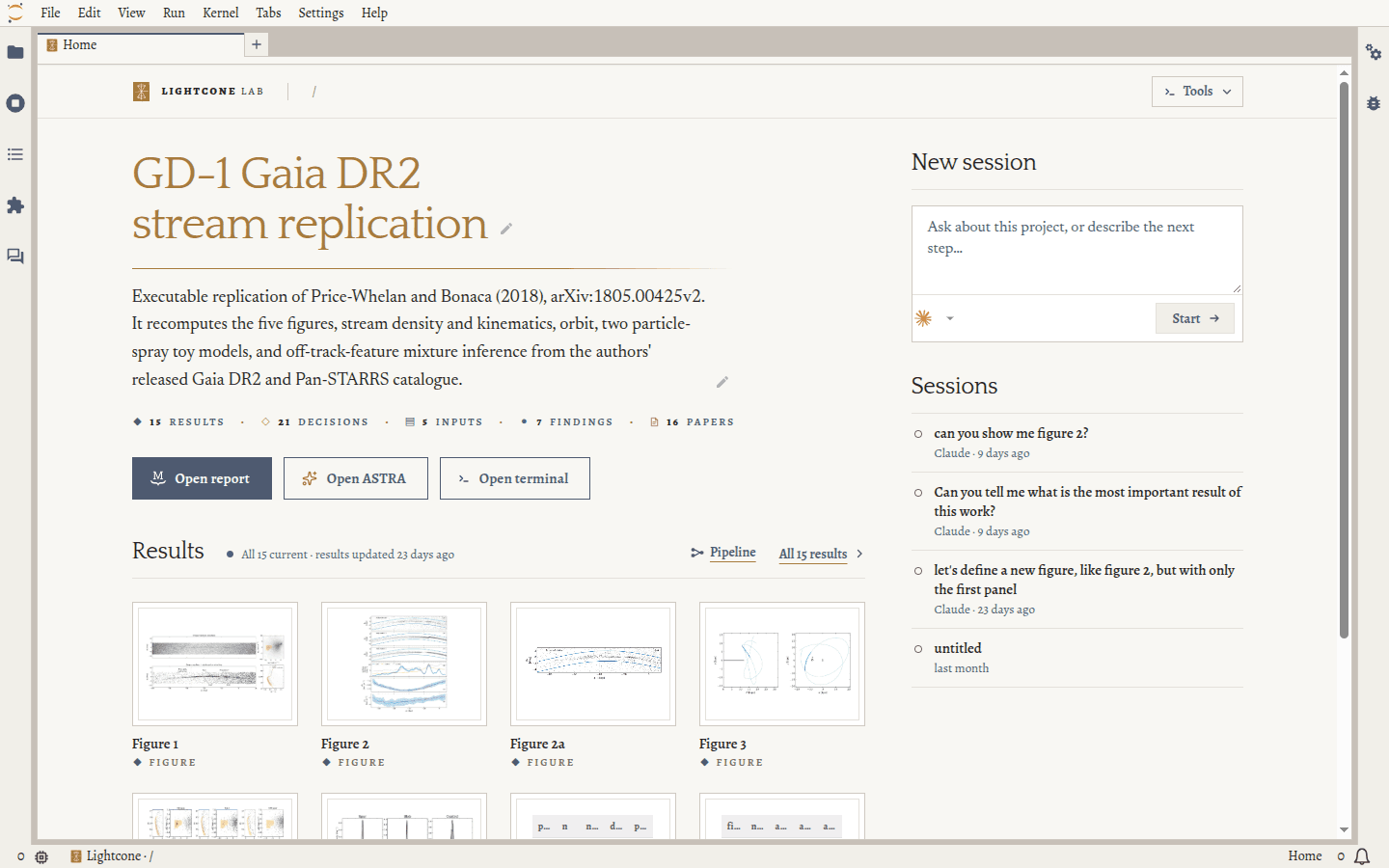
To learn more, see Lightcone Lab.
Keep working with your agent
Work with your agent as you would on any project. It knows Lightcone and ASTRA, and it updates the project's record as the analysis changes. Ask it what changed since you last looked, or which results are out of date. Keep Lightcone Lab open beside it to see each change as the agent makes it.
Next steps
- Follow Your first analysis, a worked example from a research question to a report.
- Run your recipes on an HPC cluster.
Uninstall
Remove the plugin, its marketplace and the Lightcone CLI:
claude plugin uninstall lightcone@lightcone-research
claude plugin marketplace remove lightcone-research
uv tool uninstall lightcone-cli
To remove Lightcone Lab, uninstall jupyterlab-lightcone in JupyterLab's Extension Manager. Your
projects stay as they are, with their full record in each project's git repository.